
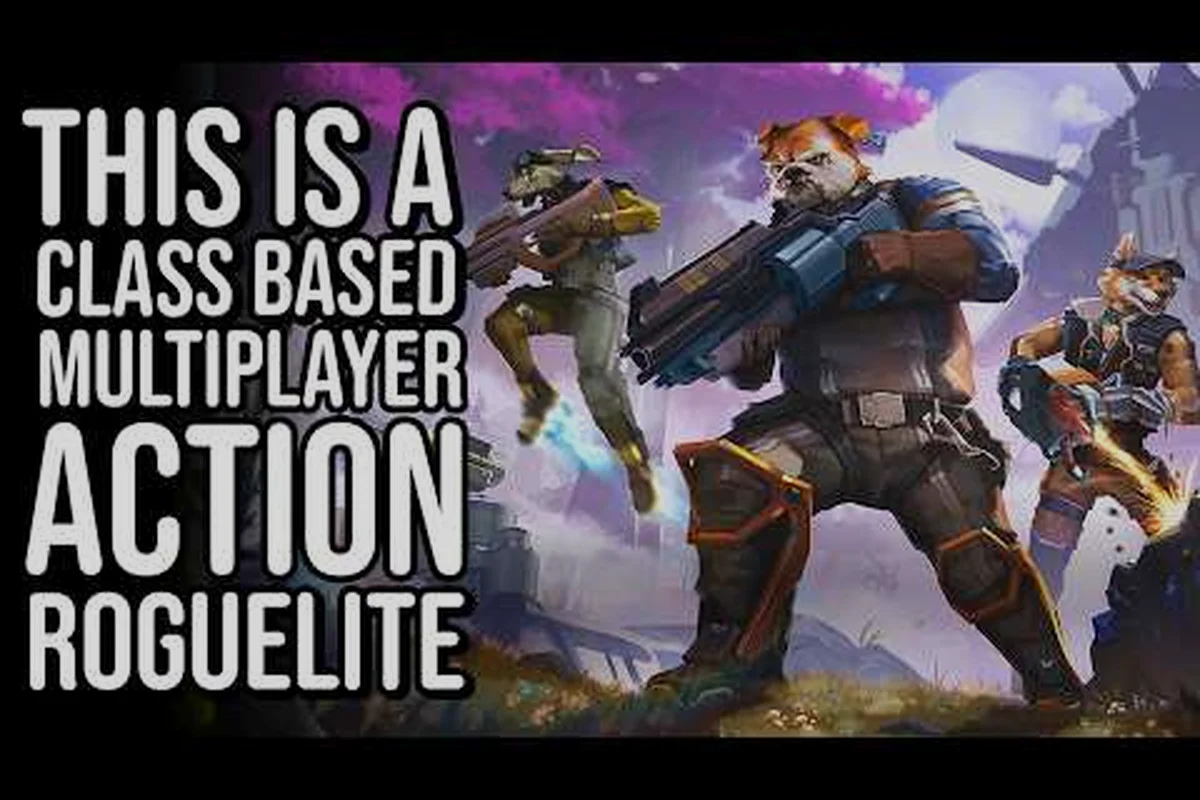
GRAVHOUNDS multiplayer turns a hostile-planet extraction run into a shared bet, and the squad lobby is where that bet gets placed. Understanding how co-op sessions form, who can join, and how deploy flow works keeps your pack from wasting a drop. This breakdown covers player counts, screen options, cross-play, and the practical steps that get four hounds onto the surface in one piece.
How GRAVHOUNDS Co-Op Sessions Are Structured
The core loop of this co-op game is simple to state and tense to execute: a pack drops onto a hostile planet, builds and defends physics-driven bases, and extracts with whatever it can carry before the alien swarm overruns the position. According to the official GRAVHOUNDS Steam page, developer Octopus Panic designed the project for squads of one to four people in the action-builder genre, which means the same session skeleton serves both a lone hound and a full four-person crew.
What changes with more players is not the ruleset but the risk math. Danger and rewards both climb the longer a crew stays on the surface, so a squad of four can push deeper and bank more than a solo run — provided everyone agrees on when to leave. The lobby exists to make that agreement possible before the drop, not after.
Session size and roles at a glance:
| Session Type | Player Count | Who It Suits | Key Consideration |
|---|---|---|---|
| Solo run | 1 | Learning base layouts | No shared extraction timing |
| Duo | 2 | Fast, low-coordination pushes | Fewer hands on defense |
| Three-hound pack | 3 | Balanced build-and-cover split | One flexible floater role |
| Full squad | 4 | Maximum haul potential | Loudest, longest fights |
Every session type uses the same maps and the same swarm behavior, so a duo learns nothing that fails to transfer to a four-player lobby. That consistency is why the co-op explained basics matter early: the habits you build in a two-person run are the habits you bring to a full pack.
Host Authority and Session Ownership
One player hosts, and that host's session is the anchor everyone else joins. In practice this means the host's platform, region, and connection quality set the ceiling for the whole crew. If the host drops mid-run, the session ends for everyone, so the steadiest connection in your group should be the one holding the lobby open.
Community reports consistently flag host stability as the single biggest quality-of-life factor in online sessions. Before you invite three friends, confirm the host is on a wired connection and has a free evening — a run that dies at minute forty because the host's router hiccuped is the most avoidable loss in the game.
GRAVHOUNDS Online Co-Op and Platform Support
The clearest official picture of platform support comes from the GRAVHOUNDS Game Preview listing on Xbox, which tags the title with online co-op for 2-4 players, Xbox cross-platform multiplayer, shared/split screen, Xbox Play Anywhere, 4K Ultra HD, HDR10, 60 fps+, cloud saves, and optimization for Xbox Series X|S. Those tags are the concrete facts behind every squad setup question, and they answer most of what new players ask before their first invite.
The important nuance is what "cross-platform multiplayer" covers. The Xbox listing confirms cross-play within the Xbox ecosystem — console and PC through the Xbox app and Play Anywhere. Steam-to-Xbox crossplay and dedicated servers remain officially unconfirmed as of this writing, so a mixed group split between Steam and console should test a session before committing to a long planned run.
Platform capability comparison:
| Feature | What's Confirmed | What's Unconfirmed |
|---|---|---|
| Online co-op | 2-4 players | — |
| Local play | Shared/split screen | Exact split layout per platform |
| Cross-play | Xbox console and PC (Play Anywhere) | Steam-to-Xbox crossplay |
| Servers | Host-based sessions | Dedicated server support |
| Progression | Cloud saves on Xbox | Cross-save between storefronts |
Reading the Store Tags Correctly
Store tags are not marketing fluff — they are the developer's own description of shipped features, and they are the safest thing to plan around. If a tag is absent, treat the feature as unavailable until you see it in a patch note or a live session. This is the same discipline that pays off when you read up on how the game's broader systems fit together, where verified mechanics beat hopeful assumptions every time.
For players on Game Pass, the Day One inclusion means the barrier to trying a four-player lobby is effectively zero. That matters because the fastest way to learn squad flow is to actually run it, not to read about it — and a free entry point removes the excuse.
Setting Up a Squad Lobby Step by Step
The lobby flow is short, but the order of operations matters. Doing these steps in sequence avoids the classic failure where three players are ready and the fourth is still installing. In practice the whole sequence takes under five minutes when everyone is prepared, but a single out-of-order step — inviting before the patch check, or picking a host who is about to lose their connection — can stall the squad for ten or more minutes and eat into your first deployment window. Treat the lobby as a pre-flight checklist rather than a formality: confirm builds, lock the host, then fire off native invites in one pass so the session ID propagates cleanly to all three squadmates at once.
Step 1: Confirm everyone's build and platform. Before anyone opens the game, agree on platform and patch version. A mismatched version blocks a join outright, and troubleshooting it after the invite is wasted time. The usual culprit is auto-update drift: one squadmate's client patches overnight while another has updates paused, so the host's session ID simply won't resolve for them and the invite dies with a generic "unable to join" error. Have each player read their build number off the main menu and compare it in the group chat before the host creates the lobby — a thirty-second check that saves a full re-invite cycle, especially on console where the patch notes and crossplay toggle live in separate menus. Step 2: Pick the host deliberately. Choose the player with the best connection and the most uninterrupted play window. The host is the session's single point of failure, so treat the role as a responsibility rather than a formality.
Step 3: Send invites from inside the session. Invite through the platform's native friend system rather than coordinating verbally. Native invites carry the session ID, which removes the "which lobby are we in" confusion that eats ten minutes off a planned run.
Step 4: Set the drop plan before deploying. Agree on a rough extraction threshold — a time or a haul value — while you are still in the lobby. Squads that decide this on the surface tend to argue at the worst possible moment.
Step 5: Deploy together and stay grouped. A split drop on a hostile planet is how packs lose members in the first two minutes. Land close, establish the base footprint, then expand. The reason is spawn-side pressure: the planet's fauna and rival packs aggro on isolated players first, and a lone hound caught mid-drop has no cover and no revive window before the timer runs out. Pick a single landing zone within sight of each other, drop the beacon and extractor together, and only then fan out to scout resource nodes — a grouped landing lets the squad share early salvage and cover each other's revive, while a scattered drop usually ends with one player bleeding out before the base is even standing. If a friend cannot join despite following these steps, the multiplayer connection guide walks through the invite and troubleshooting path in more detail, including the friend-invite errors that show up most often on console.
Local Shared and Split Screen
Shared and split screen covers the same 2-4 player range without requiring a second copy of the game or a second subscription. For households with one console, this is the cheapest route into a full squad, and it changes the social dynamic: everyone sees the same screen, so callouts become shorter and louder.
The tradeoff is screen real estate. Split screen compresses each player's view, which makes distant swarm movement harder to read. Compensate by assigning one player as the dedicated scout who watches the horizon while the others build — a division of attention that split-screen crews adopt quickly once they feel the squeeze.
Roles That Make a Four-Hound Pack Work
A full squad has four bodies and, ideally, four jobs. The action-builder loop splits naturally into building, defending, hauling, and scouting, and a pack that assigns these explicitly outperforms one that improvises. This is the practical heart of any co-op guide: role clarity beats individual skill.
Role split for a four-player run:
| Role | Primary Job | Best Paired With | Failure Mode |
|---|---|---|---|
| Builder | Places and repairs base structures | Defender | Base collapses while builder is away |
| Defender | Holds the perimeter during swarm pushes | Builder | Overextends and gets isolated |
| Hauler | Moves loot to the extraction point | Scout | Greedy trips that strand the pack |
| Scout | Reads swarm direction and calls the exit | Hauler | Calls extraction too late |
Rotate roles between runs rather than locking them permanently, and treat the swap as a deliberate drill: send the Defender to run a Hauler shift on a low-threat map, then have the Hauler hold the perimeter during a swarm push while the Builder calls the exit. A pack where only one player understands base placement is fragile, because that single point of failure stalls the entire action-builder loop the moment they go down; a pack where everyone has built once can absorb a mid-run loss without collapsing, since any surviving hound can step into the vacant job and keep the extraction timer running.
When to Call the Extraction
The extraction call is the single decision that defines a run, and it belongs to the scout by convention. The rule of thumb from community play is to call it one push earlier than feels right — the swarm escalates the longer you stay, so the margin between a clean exit and a desperate one is narrower than most crews expect.
Set a hard threshold in the lobby and honor it. A pack that agrees to leave at a specific haul value and then leaves at that value builds trust that carries into the next run, which is worth more than any single extra crate.
Cross-Play, Game Pass, and Platform Access
Access routes shape who can actually join your lobby, and the differences are worth knowing before you plan a recurring squad night. The official GRAVHOUNDS website presents the launch window as a Windows and Xbox debut through Early Access, with the title included in Xbox Game Pass from day one — a route that puts the game in front of a large audience without a purchase.
Access route comparison:
| Route | Cost Barrier | Cross-Play Reach | Best For |
|---|---|---|---|
| Xbox Game Pass | Subscription only | Xbox console and PC | Trying a full squad cheaply |
| Xbox purchase | Full price | Xbox console and PC | Long-term console crews |
| Steam purchase | Full price | Steam players (Xbox crossplay unconfirmed) | PC-first groups |
| Shared/split screen | One copy | Local only | Households on one screen |
For a squad that spans living rooms and desktops, the Game Pass route is the lowest-friction option because it covers both Xbox console and PC through Play Anywhere. A group that mixes Steam and console should verify a live session before scheduling anything recurring.
Performance Settings That Affect Squad Play
The Xbox listing confirms 4K Ultra HD, HDR10, and 60 fps+ on optimized hardware. In a four-player session, frame stability matters more than raw resolution because swarm pushes are timing-sensitive — a defender who stutters during a perimeter breach costs the pack real progress. If your crew notices frame drops during heavy swarm moments, dropping resolution a notch is a better trade than losing a base.
Cloud saves on Xbox also mean a squad can resume progression across sessions without re-earning anything, which supports the recurring-squad-night pattern that co-op games live on. Confirm everyone's saves are syncing before a planned run rather than discovering a mismatch at the lobby screen.
Common Co-Op Mistakes and How to Avoid Them
Most failed runs trace back to a small set of avoidable habits rather than difficulty. The pattern shows up across community reports: crews treat the lobby as a formality, then pay for it on the surface. In gravhounds co op, the lobby is where the run is actually won or lost — it is the only moment the full squad can agree on an extraction threshold, confirm who hosts, and decide how the drop splits before comms get noisy. Skip that conversation and the same mistakes repeat: packs argue mid-fight over whether to leave, land scattered, and let one builder carry every structure. None of these are skill gaps; they are setup gaps, and each one is cheaper to fix before the drop than after the first swarm push.
-
Deploying without an extraction threshold. The pack argues mid-fight instead of leaving. Fix: agree on a number in the lobby.
-
Letting the host be the least stable connection. One router reset ends four players' progress. Fix: the steadiest connection hosts.
-
Splitting the drop. Members land apart and get picked off alone. Fix: land together, expand after the footprint is set.
-
One player doing all the building. The pack cannot recover if that player goes down. Fix: rotate roles between runs.
-
Ignoring the swarm escalation curve. Crews stay for one more crate and lose the haul. Fix: leave one push early.
-
Assuming unconfirmed crossplay works. A Steam-and-console group plans a run that cannot start. Fix: test a session first.
Each of these costs a run, and each is fixable in the lobby in under a minute. The crews that last are the ones that treat pre-drop setup as part of the game rather than a menu to click through.
Frequently Asked Questions
How many players can join a GRAVHOUNDS multiplayer session?
Online co-op supports 2-4 players, while solo runs use the same maps and rules. Local shared and split screen covers the same 2-4 range on one screen, so a full four-hound pack can play together without a second copy of the game.
Does GRAVHOUNDS co-op support cross-play between PC and Xbox?
The Xbox Game Preview listing confirms Xbox cross-platform multiplayer, which covers Xbox consoles and PC through Play Anywhere. Steam-to-Xbox crossplay is not officially confirmed, so mixed groups should test a live session before scheduling a recurring run. The listing also names shared/split screen and local options for the same 2-4 player range, so verify the feature that matches the squad's actual setup.
What happens if the host leaves during a co-op run?
The session is host-anchored, so the host dropping ends the run for everyone in the pack. Choose the player with the most stable connection and the longest uninterrupted play window to hold the lobby, and confirm that before deploying. If the connection is uncertain, set a clear fallback host before anyone readies up.
Can I play GRAVHOUNDS co-op through Game Pass?
Yes. The listing pairs Day One Xbox Game Pass availability with an Early Access window across Windows and Xbox consoles, so a full four-player squad is the cheapest way to try the co-op loop before committing to a purchase.
Is split screen available for local co-op?
Shared and split screen is confirmed for local play, covering the same 2-4 player range as online sessions. Split screen compresses each player's view, so assign one player to watch the horizon while the others build and defend. Deciding the role split before the drop prevents a crowded local screen from derailing the first swarm contact.
Squad flow in GRAVHOUNDS comes down to a handful of decisions made before the drop: pick a stable host, agree on an extraction threshold, assign four clear roles, and confirm platform compatibility before inviting anyone. The lobby is short, but it sets the ceiling on what a pack can haul out — and a crew that treats setup as part of the run will out-extract one that treats it as a formality every time.