
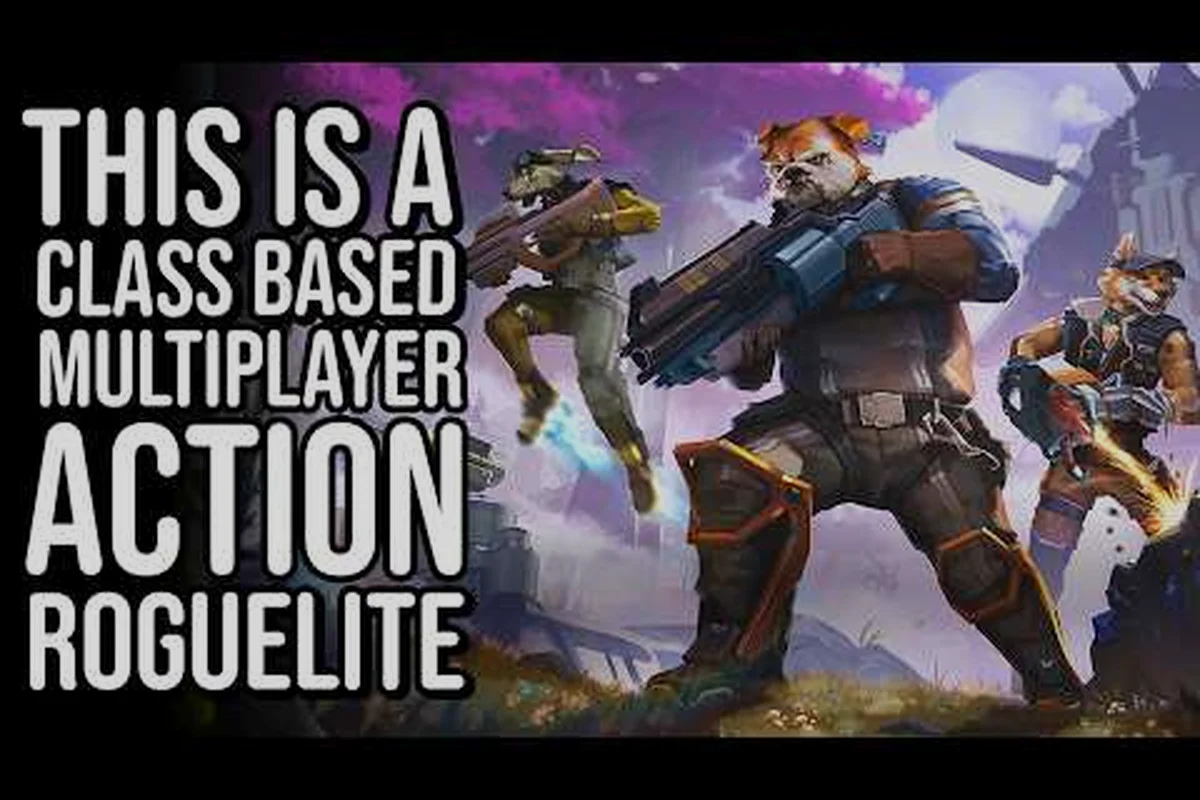
A reliable GRAVHOUNDS multiplayer guide helps friends form a team, divide responsibilities, and extract from a planetary drop before pressure becomes fatal. This guide explains how to invite people, join friends, organize a four-player squad, and build a coordinated loadout.
Preparing a GRAVHOUNDS Co-op Squad
A multiplayer run works best when every player enters the session with a clear role, a serviceable loadout, and a shared extraction plan. Two-person teams can cover essential duties more easily, while a four-person squad adds flexibility but also creates more opportunities for confused objectives and split positioning.
This GRAVHOUNDS multiplayer guide treats party formation as a chain of decisions: connect with friends, confirm the team size, assign roles, agree on priorities, and decide where everyone will regroup. That sequence prevents the most common early mistakes, such as gathering three or four players only to discover that nobody owns extraction supplies.
Choosing a party size that fits the session
| Party size | Strength | Main challenge | Recommended role split |
|---|---|---|---|
| Solo | Full control over resources | Every task must be handled personally | Use flexible solo routines |
| Two players | Clear specialization with less coordination overhead | One injured player can stall the team | Collector plus combat support |
| Three players | Good balance of roles and communication | A missing role can become obvious | Collector, fighter, and support |
| Four players | Maximum coverage and room for a dedicated scout | More voices and directions to manage | Collector, heavy fighter, support, and scout |
The four-player option is particularly useful for groups that already understand the core systems. New groups may get more from three players because each teammate can take a meaningful role without creating unnecessary overlap. That does not mean a smaller group is safer; every player still needs a way to contribute during recovery, combat, and extraction.
Before the first drop, compare the party’s recovery items, weapon coverage, and extraction capacity. A detailed GRAVHOUNDS beginner guide can help new players establish those fundamentals, but the squad should agree on priorities before entering rather than debating equipment after danger appears.
Assigning roles before deployment
Use roles as decision-making tools, not rigid character limits. Players may still pick up weapons or materials outside their assigned duties, but each teammate should own a primary responsibility so the squad can react quickly under pressure. For example, the Collector can prioritize high-value salvage while the Scout watches route hazards, even if both need to defend themselves during an ambush. This clear ownership reduces duplicated searches, preserves ammunition for emergencies, and prevents valuable field resources from being left behind.
-
Collector: Tracks high-value materials, containers, and recoverable field resources.
-
Combat support: Covers the player who gathers resources and handles nearby threats.
-
Scout: Checks routes, marks hazards, and looks for safer movement options.
-
Extraction lead: Tracks extraction requirements, calls the retreat, and confirms the team’s escape route.
When everyone performs every task, communication becomes noisy and can lead to duplicated searches, wasted field resources, or accidental group separation. Keep calls short and tied to roles: the Scout should announce route hazards and safe lanes, the Collector should report high-value containers, and the extraction lead should confirm the retreat point and extraction requirements. Use names, pings, or the party’s in-game communication tools when available, and resolve disagreements immediately rather than letting two players loot the same route.
Inviting Friends and Joining a Co-op Session
The friend-invite process is the gateway to the full multiplayer experience. Since menus can change during development, players should treat the current interface as the source of truth and verify labels against the build they are actually running. The goal remains consistent: create a party, connect with friends, and enter the same activity without one person leaving the group unintentionally.
Sending an invitation
Begin from the main menu or multiplayer panel, locate the friends list, and select the friend you want to join. If the friend is online, choose the available invite or join option, then confirm the party request. If no invitation appears, verify that both accounts are using the current platform client and that the sender has not reached a session-size or activity restriction.
For a reliable friend invitation process, send the request from the multiplayer panel only after confirming that the intended player appears in the friends list under the correct account. Select the friend’s invite action, verify the party request, and wait for the invitee to accept before launching the co-op activity. This prevents a request from being misdirected when duplicate invitations, platform-specific friend lists, or an already active party obscure the correct party slot.
| Step | Action | What to verify |
|---|---|---|
| 1 | Open the multiplayer or friends panel | Your account appears correctly signed in |
| 2 | Select the intended friend | The displayed name and status are correct |
| 3 | Choose the invite action | The request is sent to the right person |
| 4 | Confirm party entry | The member list updates on both screens |
| 5 | Start the activity together | Every member remains connected |
A rejected request does not always indicate a fault. The invitee may be busy, may already be in an incompatible activity, or may have privacy settings that limit direct invitations. Trying a fresh party after both players return to the menu can resolve a stale menu state.
Joining a friend who is already ready
When a teammate creates a lobby, the invitation may lead directly to that session. Accept the request and check the member list before the countdown begins. If the game does not offer a direct join option, ask the host for the party code or session identifier, enter it in the appropriate field, and wait for the host’s approval.
This is the practical part of learning how to invite friends and how to join an existing team. Do not start solo and assume a friend can appear later. Some activities require the full roster to be registered before departure, and joining after launch may be impossible.
If a connection fails, cancel and resend the friend invite instead of repeatedly selecting a stale invitation prompt. Check that your platform client is updated, your account status allows online sessions, and the intended player is still available rather than in another match. For example, if a three-friend co-op group cannot assemble, have each player open a fresh invite after the first attempt times out, then confirm the resulting lobby shows the correct party-code holders and full roster before the host starts the mission.
Coordinating Two-, Three-, and Four-Player Runs
Once everyone is connected, the team needs a shared operating plan. This co-op guide focuses on information flow rather than assigning permanent classes. A player can change tasks when the situation changes, as long as everyone understands who currently owns the critical objective.
Synchronizing collection and combat
The most reliable structure separates movement from observation. One player remains near gathered materials while another covers the area, allowing the collector to loot without repeatedly turning to check for danger. In a three-player team, the support player can handle threats and guide movement. In a four-player squad, the scout can watch flanks while the heavy fighter creates space.
| Situation | Best team response | Reason |
|---|---|---|
| Quiet container route | Collector leads while another player watches behind | Limits exposure during repeated searches |
| Open combat area | Two players engage while others preserve supplies | Keeps resources away from immediate danger |
| Narrow passage | One player scouts or clears the route first | Prevents the group from entering a trap together |
| Injured teammate | Remaining players secure a safe recovery area | Separates emergency care from enemy pressure |
| Extraction countdown | One player watches extraction while others bring loot | Prevents a successful run from being lost at the exit |
The party should also agree on what happens when the team is separated. A practical rule is to regroup at a safe, recognizable location rather than chase each other across the map. A chase can consume recovery items, attract additional enemies, and leave the original team unable to locate the missing player.
Handling three friends in one party
Playing with three friends creates a four-person squad, which is enough for continuous coverage but demands concise communication. Assign one person to watch the shared objective, one to manage combat, one to handle supplies, and one to lead movement. If someone is unfamiliar with squad play, start with the simpler routines in the four-player session guide before adding complicated item splits.
The team should agree on three signals before deployment: Move now, Hold position, and Group up. Use the same phrase for the same action in every squad, and reserve urgent calls for immediate danger so “Move now” is not confused with routine objective movement. For example, the combat lead can say “Hold position” while checking a route, then call “Group up” if the objective player is delayed or a teammate is missing. Keeping these calls tied to role decisions prevents the four-person squad from splitting up during co-op encounters, while a voice-free fallback can use the same labels in pings or text messages when voice communication is unavailable.
-
Move now: The route is clear or the group must retreat immediately.
-
Hold position: Someone is checking a route or recovering from damage.
-
Group up: A teammate is missing, delayed, or moving toward an objective.
These signals should be short, distinctive, and understandable at a glance. When voice communication is unavailable, pings and simple text messages can support the same system. The exact commands available may vary by platform or current version, so confirm what each player sees before departure.
Building a Shared Loadout for Cooperation
A shared loadout does not mean every player carries identical equipment. It means the squad can cover its core needs without leaving one crucial resource at the base. The best arrangement depends on available capacity, the mission, and the team’s ability to recover quickly after a bad encounter.
The official gameplay overview from ID@Xbox provides a verified four-minute-and-twenty-two-second introduction to the game. Use it to refresh the general systems, then apply the following principles to the current version your group is using.
Dividing equipment by function
| Loadout need | Why it matters in co-op | Coverage rule |
|---|---|---|
| Primary fighting power | Provides a dependable response to enemies | At least one player should be equipped to fight |
| Recovery capacity | Helps the team continue after damage | Carry enough for likely incidents, not one emergency |
| Mobility support | Improves escape options during a drop | Confirm that mobility remains available to the whole team |
| Extraction resources | Supports departure with recovered loot | Assign responsibility before the final approach |
| Utility tools | Supports searching, repair, or objective work | Avoid placing every useful item on one player |
| Backup supplies | Creates a second chance after an accident | Store critical extras at the shared base |
A useful rule is one carrier, one backup. If one player carries all extraction resources, a second person should carry enough support to recover the team if that carrier is lost. This is not a fixed formula for every mission; it is a simple check that prevents a single point of failure.
Sharing the base inventory
A shared base lets players stage supplies for the next run. Keep mission-critical resources in a clearly defined area, but assign someone to organize them. A base with labeled containers or separate piles is easier to use than one where items are scattered by deposit order.
The base-building and base-defense guide can help with storage and defensive priorities. For multiplayer specifically, organize shared resources around roles rather than item names alone. For example, place recovery supplies together, extraction materials together, and emergency combat gear together. Then each player knows where to look when urgency removes time for searching.
Do not let one teammate become the only person who understands the shared base inventory. After depositing recovery supplies or extraction materials, briefly note the item and its container location in chat—for example, “meds in the blue crate” or “extraction parts in the east pile.” This handoff prevents another GRAVHOUNDS co-op partner from searching every container during a raid and keeps access clear when a player with friends joins the run later.
Running a Coordinated Planetary Drop
The safest planetary drop is the one the team enters with a clear purpose. Decide the destination, identify the primary resource, set a collection limit, and agree on the condition that triggers extraction. Without a cutoff, successful players can remain in danger long enough to lose their accumulated progress.
This coop run plan breaks the mission into four phases: preparation, cautious entry, active collection, and extraction. During preparation, divide the team’s responsibilities into scouting, resource collection, and extraction support, then establish callouts for contact, full cargo, and emergency disengagement. In cautious entry, pause near the drop perimeter to check threats before spreading out. During active collection, keep sightlines open and regroup after each cache, while the designated support player monitors the extraction route. Once the collection limit or danger threshold is reached, the whole squad should extract together rather than letting one player continue searching.
Phase one: preparation
Before launching, inspect the inventory, confirm the roster, and review each player’s role. Make sure nobody has volunteered for equipment the team cannot spare. If the party needs specific materials, assign them to a collector rather than allowing everyone to duplicate the same item.
| Preparation check | Preferred result |
|---|---|
| Party roster | All intended players are connected and ready |
| Role assignment | Every critical duty has an owner |
| Recovery supplies | The squad has enough for likely damage |
| Mission objective | The team agrees what to collect |
| Extraction threshold | Everyone knows when to leave |
| Failure plan | The group has a regroup location and fallback |
Phase two: cautious entry
Start more cautiously than necessary. The first area can reveal enemy density, useful routes, and the location of extraction services. Keep the formation compact enough that support can reach the collector, but avoid standing directly on the same tile or route.
If you are new to the core mission loop, the demo and extraction walkthrough offers a focused way to understand departure objectives before the group commits to a full run. The important multiplayer principle is that everyone should recognize the extraction condition, not merely the player who pressed the button.
Phase three: active collection
Once the area feels manageable, split only as far as the map permits. Keep one team member near the objective while others scout or engage. Call out rare items and route changes, but avoid narrating every small action because constant updates can bury the warning that matters.
Set a collection cap based on risk rather than ambition. If combat increases, the squad should decide whether to bank current gains or complete one more route. A disciplined retreat is often more valuable than another item that requires unnecessary recovery items.
Phase four: extraction
Start the extraction sequence early enough to absorb interruptions without turning the team into a disorganized rush. In a two-player GRAVHOUNDS run, the collector should call out the destination and required salvage materials before the support player commits to the approach, while the support player tracks pursuit signs and handles threats before they close in. If either role is uncertain, pause the handoff and regroup: arriving at the extraction point with intact cargo matters more than taking the fastest route.
Extraction is where coordination often becomes untidy. Players may rush toward the exit, abandon a teammate, or attempt to carry more than they can protect. Reestablish the original roles as soon as the team reaches the approach: collector stays with the load, support covers the route, and the extraction lead confirms completion.
Recovering When the Team Falls Apart
Every coordinated GRAVHOUNDS run has failure states: a player disconnects, a teammate is separated, the group loses recovery capacity, or the extraction path becomes blocked. Treat each incident as an operational problem rather than assigning blame immediately. For example, after a disconnect leaves the squad without its designated recovery carrier, regroup the remaining players, redistribute the available recovery supplies, and decide whether to continue the extraction or preserve the current inventory. A rapid role reassignment prevents one failed connection from turning a recoverable setback into a total run loss.
Begin by identifying the Recovery Priority—the player whose survival gives the team its best chance to recover. Move toward that player only after confirming the route is safe. If the group cannot reach them, preserve the resources already collected and return to the shared base to rebuild instead of turning a recovery attempt into a second total loss.
| Problem | Immediate response | Longer-term adjustment |
|---|---|---|
| Player disconnects | Reassign roles and shorten the plan | Review platform and connection stability |
| Teammate is separated | Mark a safe regroup point | Keep groups within communication range |
| Recovery supplies run low | Retreat and preserve remaining value | Carry one backup recovery kit |
| Extraction route is blocked | Locate an alternate route or disengage | Scout extraction approaches earlier |
| Inventory is overloaded | Stop collecting and extract | Set a mission collection cap |
The final settlement also depends on preparation. Store essential recovery and extraction items at the base, communicate where they are, and make sure the person responsible for each category understands how to retrieve it. Better preparation reduces the number of emergency decisions during a pressured run.
Frequently Asked Questions
Can three friends and one player join the same GRAVHOUNDS session?
Yes, assuming the current version supports four-player sessions and all four accounts can access the same activity. The party host should confirm the roster before starting, because invitations can expire or become invalid after a player changes activities. Keep the platform client open, accept the invitation promptly, and verify that all four names appear in the member list.
What is the best way to invite friends to GRAVHOUNDS multiplayer?
Open the friends or multiplayer panel from the main menu, select the intended account, and send an available party invitation. If the invite does not arrive, confirm that both players are online and using compatible platform services. Starting a fresh lobby can also bypass a stale connection, after which the host can invite the remaining friends again.
Does GRAVHOUNDS support two-player co-op with friends?
A two-player group is easier to coordinate than a larger party because only one support role needs to be covered. One player can collect while the other protects the route, with both agreeing on recovery limits and extraction timing. The shared base is especially useful here because unused recovery supplies can remain available for the next attempt.
How should a four-player squad divide resources during a drop?
Give the collector priority access to mission materials while a combat-focused player handles threats. A third player can provide flexible support, and the fourth can scout routes and watch the extraction approach. Keep recovery supplies with a designated carrier and maintain one backup recovery kit so the squad does not depend completely on a single player.
What should a GRAVHOUNDS team do after a player disconnects?
Reassign the disconnected player’s role immediately and avoid stretching the squad across multiple routes. If the remaining group can safely recover shared supplies, do so; otherwise, preserve the current progress and return to base. After the session, check platform status and reconnect before creating another party to reduce repeated failures.